
How To Configure Static IP address Debian 13 Server1 min read
Now I want to share how to Configure Static IP address Debian 13 Server using terminal.
Open ip config file using nano command.
nano /et/network/interfaces
After open this file you can see as like below config
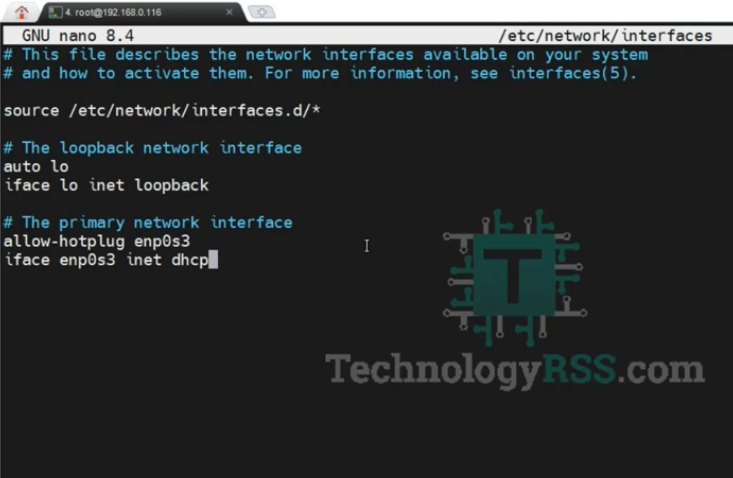
Then Insert below all line into this file.
iface enp0s3 inet static
address 192.168.0.20
netmask 255.255.255.0
gateway 192.168.0.1
As like below image after my config.
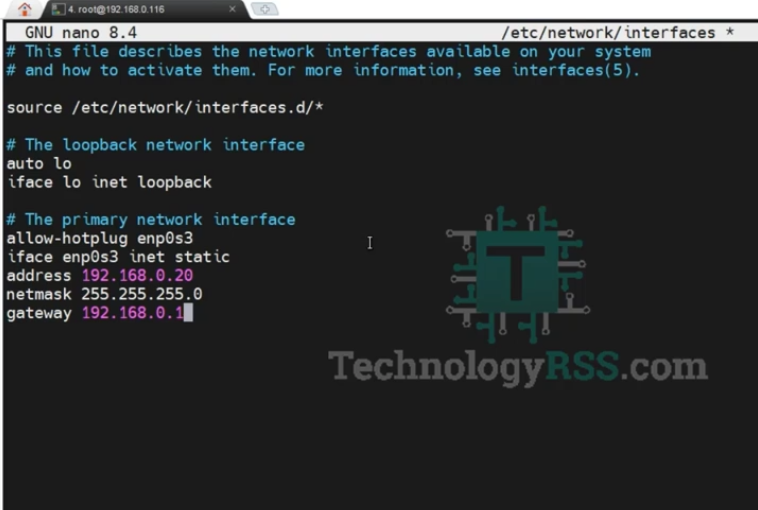
Then save and exit, Ctrl+X the type Y for save.
Then going to terminal and reboot your server.

I am system administrator as Windows and Linux platform. I have 4 years skilled from the professional period. I have to configure Linux based system such as an Asterisk VOIP system, Network monitoring tools (ZABBIX), Virtualization (XEN Server), Cloud computing (Apache CloudStack) etc. Now share my professional skill each interested person.
Thanks to all.
Thanks to all.
Latest posts by Admin (see all)
- How To Configure Static IP address Debian 13 Server - September 20, 2026
- How To Install Zabbix 8.0 on Debian 13 - September 19, 2026
- How To Enable SSH On Debian 13 Server - September 13, 2025